Export QuickBooks Online Invoices to Excel or CSV
You can export QuickBooks Online invoices to Excel from the Invoice List report, or use EXIZIP to download one spreadsheet in Excel (.xlsx) or CSV with one row per invoice: invoice number, customer, invoice date, due date, total, balance, currency and memo. Line items are not included.
- 14-Day Free Trial — No Credit Card Required.
- Cancel Anytime · Secure Payments Powered by Stripe.
Short answer
QuickBooks Online exports its Invoice List report to Excel. EXIZIP exports a ready-made invoice spreadsheet in Excel or CSV, one row per invoice, straight to your computer.
Option 1: Export the Invoice List report in QuickBooks Online
- In QuickBooks Online, go to Reports.
- Search for Invoice List and open the report.
- Set the date range you need and click Run report.
- Click the Export icon at the top of the report and choose Export to Excel.
You get the report in Excel, without the invoice PDFs.
Option 2: Export invoices to Excel or CSV with EXIZIP
- Install EXIZIP from the Chrome Web Store and connect QuickBooks Online.
- Open EXIZIP and click Spreadsheet export (CSV / Excel).
- Choose Invoices, then Excel (.xlsx) or CSV.
- Click Export. The file downloads to your computer.
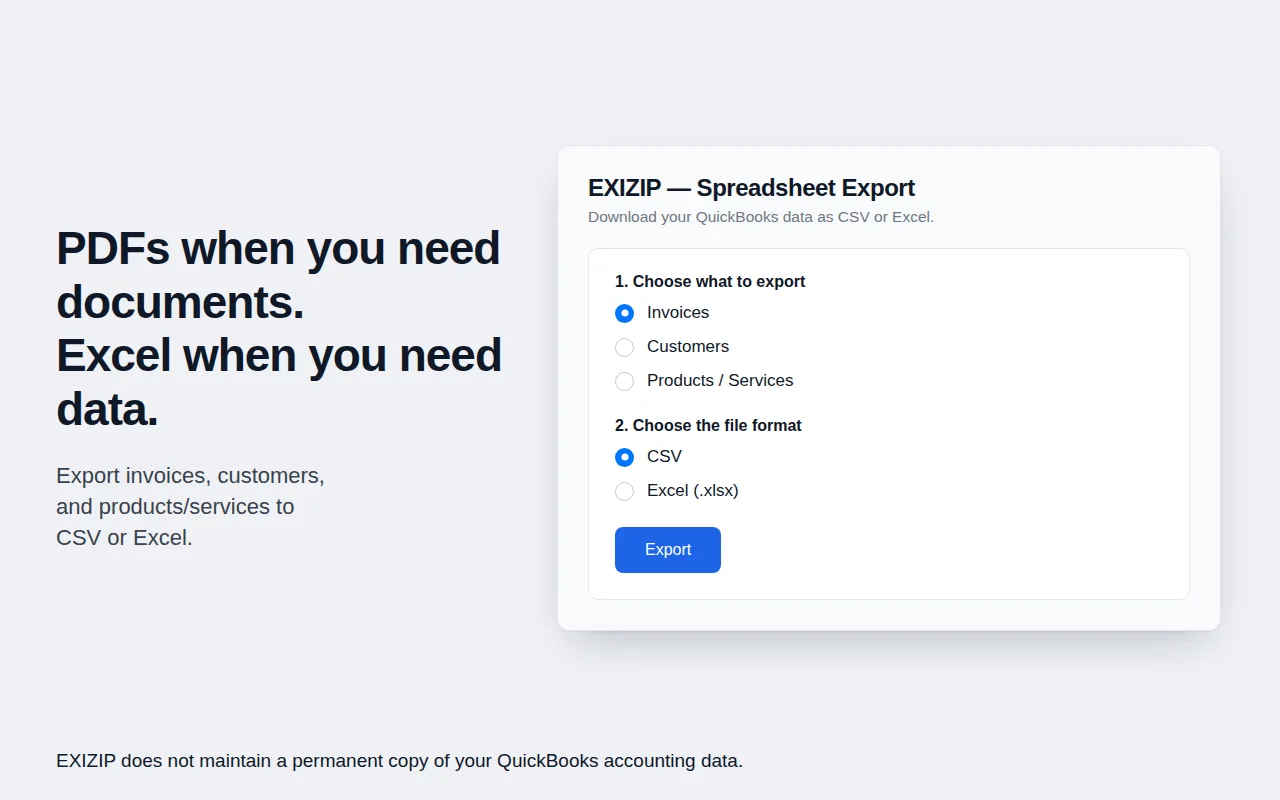
The spreadsheet is built in your browser from data fetched directly from QuickBooks Online. No invoice data is uploaded to Stanrell servers.
What the spreadsheet contains
EXIZIP exports one row per invoice. The spreadsheet has these columns, read directly from QuickBooks Online:
| Column | What it holds |
|---|---|
| Invoice Number | The invoice number shown in QuickBooks Online |
| Customer | The customer the invoice was issued to |
| Invoice Date | Transaction date |
| Due Date | Payment due date |
| Total | Invoice total |
| Balance | Amount still open |
| Currency | Invoice currency code |
| Memo | Internal memo (private note) |
Invoice line items (products, quantities, rates) are not included. If you need the full invoice document, export the invoices as individual PDFs as well.
Customer and product lists too
The same export page can produce two more spreadsheets:
- Customers: customer name, company name, email, phone, billing address, city, state, ZIP / postal code, country, balance and active status.
- Products / Services: name, type, description, sales price / rate, income account, taxable and active status.
When you also need the invoice PDFs
Excel and CSV give you invoice data. When you need the invoice documents themselves, EXIZIP exports each invoice as its own PDF, named with its invoice number, customer and date, for example Invoice-1043-Acme-Co-2026-03-31.pdf. See EXIZIP and the bulk export guide.
Frequently asked questions
Does the Excel or CSV export include invoice line items?
No. EXIZIP exports one row per invoice with invoice number, customer, invoice date, due date, total, balance, currency and memo. Line items are not included.
Can I export invoices to CSV during the free trial?
Yes. Excel and CSV exports don't count toward the free-trial limit of 500 invoice PDFs per rolling 24 hours, but they pause when that PDF limit is reached and when the 14-day trial ends.
Is my invoice data uploaded anywhere?
No. The spreadsheet is generated in your Chrome browser from data fetched directly from QuickBooks Online and saved to your computer. No invoice data is uploaded to Stanrell servers.
Can QuickBooks Online export an invoice list without an app?
QuickBooks Online can export reports such as the Invoice List report to Excel. EXIZIP adds a ready-made invoice spreadsheet in Excel or CSV and, when you need them, the individual invoice PDFs.
- 14-Day Free Trial — No Credit Card Required.
- Cancel Anytime · Secure Payments Powered by Stripe.